ip
Akari User Guide
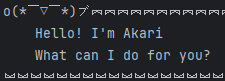
A cheerful chatbot that helps you manage your tasks with style! Akari saves your tasks between sessions, so you never lose track of what’s important.
Features
- Add, list, mark, unmark, delete, and find tasks with simple commands.
- Three task types: Todo, Deadline, Event (with date/time support).
- Persistent storage: Your tasks are saved automatically and reloaded when you return.
- Search by task description or date: Quickly find what you need.
- Expressive feedback: Akari responds with fun emoticons and clear messages.
Quick Start
Launch Akari and type commands directly. Here’s what you can do:
| Command | Example | What it does |
|---|---|---|
todo DESCRIPTION |
todo return book |
Adds a simple todo task |
deadline DESCRIPTION /by DT |
deadline return book /by 2025-10-02T18:00 |
Adds a task with a deadline |
event DESCRIPTION /from DT /to DT |
event return book /from 2025-10-02T18:00 /to 2025-10-02T19:00 |
Adds an event with start and end times |
list |
list |
Shows all tasks |
mark INDEX or mark DESCRIPTION |
mark 1 or mark return book |
Marks a task as done |
unmark INDEX or unmark DESCRIPTION |
unmark 1 or unmark return book |
Marks a task as not done |
delete INDEX or delete DESCRIPTION |
delete 1 or delete return book |
Removes a task |
find KEYWORD |
find return book |
Searches tasks by description |
date YYYY-MM-DD |
date 2025-10-02 |
Lists tasks occurring on a specific date |
bye |
bye |
Exits Akari |
Date/Time Format: Use YYYY-MM-DDThh:mm (e.g., 2025-10-02T18:00).
Examples
Add a todo: todo return book
o(〃^▽^〃)o 🕬︗︗︗︗︗︗︗︗︗︗︗︗︗︗︗︗︗︗︗︗︗︗︗︗︗︗︗︗︗︗︗︗︗︗︗︗︗︗︗︗︗︗︗︗︗︗︗︗︗︗︗︗︗︗︗︗︗︗︗︗
    Got it. I've added this task:
        [T][ ] return book
    Now you have 1 in the list
︘︘︘︘︘︘︘︘︘︘︘︘︘︘︘︘︘︘︘︘︘︘︘︘︘︘︘︘︘︘︘︘︘︘︘︘︘︘︘︘︘︘︘︘︘︘︘︘︘︘︘︘︘︘︘︘︘︘︘︘
Add a deadline: deadline return book /by 2025-10-02T18:00
o(〃^▽^〃)o 🕬︗︗︗︗︗︗︗︗︗︗︗︗︗︗︗︗︗︗︗︗︗︗︗︗︗︗︗︗︗︗︗︗︗︗︗︗︗︗︗︗︗︗︗︗︗︗︗︗︗︗︗︗︗︗︗︗︗︗︗︗
    Got it. I've added this task:
        [D][ ] return book (by: Oct 02 2025 18:00)
    Now you have 1 in the list
︘︘︘︘︘︘︘︘︘︘︘︘︘︘︘︘︘︘︘︘︘︘︘︘︘︘︘︘︘︘︘︘︘︘︘︘︘︘︘︘︘︘︘︘︘︘︘︘︘︘︘︘︘︘︘︘︘︘︘︘
Add an event: event return book /from 2025-10-02T18:00 /to 2025-10-02T19:00
o(〃^▽^〃)o 🕬︗︗︗︗︗︗︗︗︗︗︗︗︗︗︗︗︗︗︗︗︗︗︗︗︗︗︗︗︗︗︗︗︗︗︗︗︗︗︗︗︗︗︗︗︗︗︗︗︗︗︗︗︗︗︗︗︗︗︗︗
    Got it. I've added this task:
        [E][ ] return book (from: Oct 02 2025 18:00 to: Oct 02 2025 19:00)
    Now you have 1 in the list
︘︘︘︘︘︘︘︘︘︘︘︘︘︘︘︘︘︘︘︘︘︘︘︘︘︘︘︘︘︘︘︘︘︘︘︘︘︘︘︘︘︘︘︘︘︘︘︘︘︘︘︘︘︘︘︘︘︘︘︘
List all tasks: list
( ̄y▽ ̄)╭ Ohohoho.....︗︗︗︗︗︗︗︗︗︗︗︗︗︗︗︗︗︗︗︗︗︗︗︗︗︗︗︗︗︗︗︗︗︗︗︗︗︗︗︗︗︗︗︗︗︗︗︗︗︗︗︗︗︗︗︗︗︗︗︗
    Here are the tasks in your list:
    1.[T][ ] return book
    2.[D][ ] return book (by: Oct 02 2025 18:00)
    3.[E][ ] return book (from: Oct 02 2025 18:00 to: Oct 02 2025 19:00)
︘︘︘︘︘︘︘︘︘︘︘︘︘︘︘︘︘︘︘︘︘︘︘︘︘︘︘︘︘︘︘︘︘︘︘︘︘︘︘︘︘︘︘︘︘︘︘︘︘︘︘︘︘︘︘︘︘︘︘︘
Mark a task: mark 1 or mark return book
໒(◔ᴗ◔)७✎▤︗︗︗︗︗︗︗︗︗︗︗︗︗︗︗︗︗︗︗︗︗︗︗︗︗︗︗︗︗︗︗︗︗︗︗︗︗︗︗︗︗︗︗︗︗︗︗︗︗︗︗︗︗︗︗︗︗︗︗︗
    Nice! I've marked this task as done:
        [D][X] return book (by: Oct 02 2025 18:00)
︘︘︘︘︘︘︘︘︘︘︘︘︘︘︘︘︘︘︘︘︘︘︘︘︘︘︘︘︘︘︘︘︘︘︘︘︘︘︘︘︘︘︘︘︘︘︘︘︘︘︘︘︘︘︘︘︘︘︘︘
Unmark a task: unmark 1 or unmark return book
(╯°□°)╯︵ ┻━┻︗︗︗︗︗︗︗︗︗︗︗︗︗︗︗︗︗︗︗︗︗︗︗︗︗︗︗︗︗︗︗︗︗︗︗︗︗︗︗︗︗︗︗︗︗︗︗︗︗︗︗︗︗︗︗︗︗︗︗︗
    OK, I've marked this task as not done yet:
        [D][ ] return book (by: Oct 02 2025 18:00)
︘︘︘︘︘︘︘︘︘︘︘︘︘︘︘︘︘︘︘︘︘︘︘︘︘︘︘︘︘︘︘︘︘︘︘︘︘︘︘︘︘︘︘︘︘︘︘︘︘︘︘︘︘︘︘︘︘︘︘︘
Delete a task: delete 1 or delete return book
ᕦ(ò_óˇ)ᕤ︗︗︗︗︗︗︗︗︗︗︗︗︗︗︗︗︗︗︗︗︗︗︗︗︗︗︗︗︗︗︗︗︗︗︗︗︗︗︗︗︗︗︗︗︗︗︗︗︗︗︗︗︗︗︗︗︗︗︗︗
    Got it. I've removed this task:
        [T][ ] return book
    Now you have 0 in the list
︘︘︘︘︘︘︘︘︘︘︘︘︘︘︘︘︘︘︘︘︘︘︘︘︘︘︘︘︘︘︘︘︘︘︘︘︘︘︘︘︘︘︘︘︘︘︘︘︘︘︘︘︘︘︘︘︘︘︘︘
Find tasks: find return book
ᕦ(ò_óˇ)ᕤ︗︗︗︗︗︗︗︗︗︗︗︗︗︗︗︗︗︗︗︗︗︗︗︗︗︗︗︗︗︗︗︗︗︗︗︗︗︗︗︗︗︗︗︗︗︗︗︗︗︗︗︗︗︗︗︗︗︗︗︗
    Here are the matching tasks in your list:
    [T][ ] return book
    [D][ ] return book (by: Oct 02 2025 18:00)
    [E][ ] return book (from: Oct 02 2025 18:00 to: Oct 02 2025 19:00)
︘︘︘︘︘︘︘︘︘︘︘︘︘︘︘︘︘︘︘︘︘︘︘︘︘︘︘︘︘︘︘︘︘︘︘︘︘︘︘︘︘︘︘︘︘︘︘︘︘︘︘︘︘︘︘︘︘︘︘︘
Task on a date: date 2025-10-02
(╯°□°)╯︵ ┻━┻︗︗︗︗︗︗︗︗︗︗︗︗︗︗︗︗︗︗︗︗︗︗︗︗︗︗︗︗︗︗︗︗︗︗︗︗︗︗︗︗︗︗︗︗︗︗︗︗︗︗︗︗︗︗︗︗︗︗︗︗
    Here are the tasks for the date:
    [D][ ] return book (by: Oct 02 2025 18:00)
    [E][ ] return book (from: Oct 02 2025 18:00 to: Oct 02 2025 19:00)
︘︘︘︘︘︘︘︘︘︘︘︘︘︘︘︘︘︘︘︘︘︘︘︘︘︘︘︘︘︘︘︘︘︘︘︘︘︘︘︘︘︘︘︘︘︘︘︘︘︘︘︘︘︘︘︘︘︘︘︘
Exit: bye
ヾ( ̄▽ ̄) Bye~Bye~︗︗︗︗︗︗︗︗︗︗︗︗︗︗︗︗︗︗︗︗︗︗︗︗︗︗︗︗︗︗︗︗︗︗︗︗︗︗︗︗︗︗︗︗︗︗︗︗︗︗︗︗︗︗︗︗︗︗︗︗
    Hope to see you again soon!
︘︘︘︘︘︘︘︘︘︘︘︘︘︘︘︘︘︘︘︘︘︘︘︘︘︘︘︘︘︘︘︘︘︘︘︘︘︘︘︘︘︘︘︘︘︘︘︘︘︘︘︘︘︘︘︘︘︘︘︘
Data Persistence
Your tasks are saved automatically when you exit. They’ll be there when you return—no need to worry about losing your list!
Need Help?
Akari’s responses are friendly and clear. If you’re unsure, just type a command and see the command usage.